

We'll discuss your goals, current challenges, and how our process can help to drive real business growth.
YouTube
Do Thumbnails Increase YouTube Video Views? Yes, Data Says.
Rutvik Shirude
March 23, 2026
5 min
TABLE OF CONTENTS
Yes, thumbnails directly increase YouTube views. According to YouTube’s Creator Academy, 90% of the best-performing videos on the platform use custom thumbnails. Research from VidIQ shows that thumbnails with expressive faces can lift click-through rates by 20–30%, and other studies report engagement improvements of up to 154% compared to auto-generated frames.
The reason is straightforward. Thumbnails are the first thing viewers evaluate when deciding whether to click on a video. A stronger thumbnail means a higher click-through rate (CTR), which signals YouTube’s algorithm to show the video to more people. More impressions with a good CTR means more views. It’s a compounding loop.
This article breaks down exactly how thumbnails impact YouTube views, what role they play in the algorithm, whether they matter on Shorts, and what to do (and not do) when changing them.
How Do Thumbnails Affect YouTube Views and CTR?
Thumbnails affect YouTube views by influencing click-through rate (CTR). CTR is the percentage of people who click on your video after seeing it. It’s calculated by dividing clicks by impressions. For example, if your video gets 1,000 impressions and 80 clicks, your CTR is 8%.
Your thumbnail is the single biggest factor that determines this rate. Before a viewer reads the title, they process the image. That visual evaluation happens in milliseconds, and it’s what decides whether an impression becomes a view.
In other words, a video with a strong custom thumbnail will consistently outperform the same video with a default frame grab. That’s true whether you’re running a channel with 500 subscribers or 500,000.
💡Pro Tip: Don’t pick a frame from your video and call it done. Design your thumbnail as a separate asset with a clear focal point, readable text, and high-contrast colors. Treat it like a mini billboard for your content.
Do Thumbnails Impact How YouTube’s Algorithm Recommends Videos?
Yes, thumbnails indirectly impact YouTube’s recommendation algorithm by changing viewer behavior. The feedback loop works like so: A higher CTR tells YouTube that viewers find your content relevant. YouTube responds by showing the video to more people on the Homepage, in Suggested Videos, and across Browse surfaces. More impressions follow. If those new viewers also click, the cycle compounds.
One important thing to note is that changing a thumbnail does not directly affect the algorithm. It changes how viewers respond to your video. The algorithm then reacts to that new behavior. A new thumbnail alters the perception, which changes click and watch patterns, and YouTube adjusts distribution based on those updated signals.
The results of getting this right can be significant. For example, TubeBuddy has documented creators seeing 37–110% improvements in CTR after thumbnail swaps. In one specific case study, a single thumbnail change took a video from 300,000 views to 1.1 million. Same video, same title, same content. Just a better image.
Do Thumbnails Matter on YouTube Shorts?
Thumbnails matter on YouTube Shorts, but not in the way they matter for long-form videos. In the vertical Shorts feed (the swipeable mobile feed), viewers never see your thumbnail because videos autoplay. So in that specific context, your thumbnail has zero impact on views.
However, Shorts appear in several other places where thumbnails do influence clicks. These include: YouTube Search results, Homepage recommendations, your channel page, playlists, and external embeds (social media, blogs, websites). On all of these surfaces, a strong thumbnail improves CTR.
The practical distinction is this: for quick, trend-based Shorts, picking the best auto-generated frame is usually sufficient. But for evergreen or search-targeted Shorts (tutorials, how-tos, explainers), a custom thumbnail is worth the effort because these videos continue to surface in search and recommendations for months.
🤔 Did You Know? YouTube now supports custom 9:16 vertical thumbnails for Shorts. If you upload a standard 16:9 image, YouTube may crop it to fit vertical display, cutting off key text or visuals. Designing vertical thumbnails specifically for Shorts avoids this problem entirely.
Does Changing YouTube Thumbnails Hurt or Help Views?
Changing a YouTube thumbnail can help or hurt views depending on when and why you do it. The change itself does not reset your video’s existing views, watch time, or retention data. YouTube treats thumbnails as metadata, so your historical performance stays fully intact.
Changing a YouTube video thumbnail is recommended when a video’s CTR is below your channel average within the first 24–48 hours after publishing, or when an older video still receives impressions but converts poorly into clicks. In these cases, a thumbnail swap is a smart, data-backed move.
But changing the thumbnail when the video is already performing well significantly hurts its performance. Swapping a working YouTube thumbnail risks losing your ranking position, especially in search. For example, if viewers start clicking a competitor’s video instead of yours after the change, YouTube may permanently shift that search ranking in their favor.
The safest approach is to check your CTR data in YouTube Studio before making changes. If available, use YouTube’s built-in Test & Compare feature to A/B test thumbnail options before committing to a permanent switch.
How to A/B Test YouTube Thumbnails Before Committing to a Change?
Rather than guessing which thumbnail will perform better, you can test it.
YouTube's built-in Test & Compare feature lets creators run A/B tests by showing different thumbnails to different audience segments and measuring which one earns a higher share of watch time. Third-party tools like TubeBuddy and ThumbnailTest offer similar functionality with more granular analytics.
The process is simple: upload two (or three) thumbnail variations for the same video, let the test run for a set period, and let the data decide.
YouTube will automatically label the stronger performer as "Preferred" and make it visible to all viewers.
That said, not every test produces a clear winner. Some tests end early due to ineligibility (for example, if the video doesn't generate enough impressions during the test window), and others finish without a statistically conclusive result. Both outcomes are still useful because they tell you something about your audience's visual preferences.
⚡GrowthOS A/B Test: 26/11 Mumbai Attack Video
We tested two thumbnail variations for a video titled "Tahawwur Rana is the Mastermind of 26/11 Mumbai Attack | Ft. Lt. Col. Sundeep Sen" on the WONE channel.
Thumbnail A used a news-style frame with the text "What Happened on 26/11." Thumbnail B used a bolder design with close-up faces and the text "He Killed 26/11 Terrorists."

The test ran for about 24 hours before stopping due to ineligibility. Even in that short window, the results were telling: Thumbnail B captured 59.4% of watch time share versus 40.6% for Thumbnail A, and YouTube marked it as the preferred option.

The takeaway: bold, people-driven visuals with direct, emotionally charged text outperformed the more generic news framing.
⚡GrowthOS A/B Test: BSF Parliament Attack Video
We ran a second test on a video titled "BSF's Legendary Operation: How Ghazi Baba Was Encountered ft. Ex NIA, DIG (Retd) - NND Dubey."
Thumbnail A featured a close-up of the guest with the text "He Killed India's Most Wanted." Thumbnail B used a red-heavy design with an illustrated face and the text "Parliament Attack Mastermind."

This test ran for 14 days and finished without a conclusive result, with Thumbnail A at 51.4% and Thumbnail B at 48.6% watch time share. YouTube still selected Thumbnail A as the visible option, but the margin was slim.
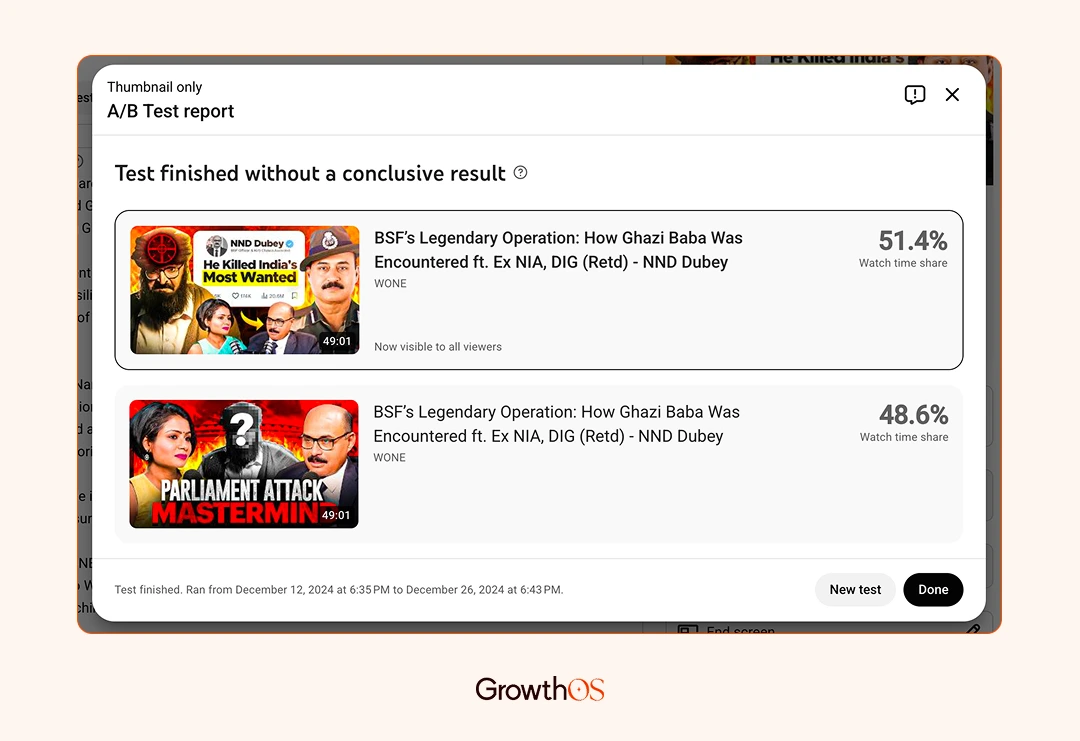
The lesson here: when both thumbnails follow strong design principles (faces, contrast, bold text), the performance gap narrows. Testing still matters because even a 2-3% edge compounds over thousands of impressions.
What Makes a YouTube Thumbnail Design That Gets Clicks?
The most effective YouTube thumbnail designs share a few consistent traits. You don’t need a design background to apply them, but you do need to be intentional about each element.
One clear focal point. This means a close-up face, a key object, or a single visual that communicates the video’s topic in under a second. Cluttered thumbnails with multiple competing elements get scrolled past.
High contrast colors. Your thumbnail sits against YouTube’s white or dark background depending on the viewer’s device. Bold color combinations (for example, yellow on dark, red on white) help it stand out in a crowded feed.
Five words of text, maximum. Most YouTube views come from mobile devices where thumbnails display at small sizes. If your text isn’t readable on a phone screen, it’s adding visual noise, not value.
Honest representation of the content. Clickbait thumbnails might earn short-term clicks, but they tank retention. Low retention signals YouTube to stop recommending the video, which means the initial CTR boost actually hurts your long-term reach.
Consistent visual branding. When viewers can recognize your videos at a glance through consistent fonts, colors, or layout, your channel builds familiarity. That recognition compounds over time and drives higher repeat click rates.
⚠️ Common Mistake: Don’t change thumbnails on a video that’s actively gaining views just because you designed something “better.” If the current thumbnail is working, leave it alone. Save the new approach for your next upload.
The Bottom Line
Thumbnails are already a high-impact growth lever, and they’re becoming even more important. YouTube’s Test & Compare tool is making A/B testing accessible to more creators. AI-powered thumbnail generators are lowering the design barrier. And with Shorts thumbnails now appearing in search and on the homepage, even short-form creators need to think visually.
The channels that treat thumbnails as a system (not a one-off task) are the ones that compound views month over month.
If you want to grow your YouTube channel but don’t have the bandwidth to optimize thumbnails, titles, and content strategy, that’s exactly what we do at GrowthOS. Book a free discovery call and let’s talk about turning your YouTube presence into a real growth channel.

Rutvik Shirude
Co-Founder
Rutvik shirude is a Co-Founder and YouTube growth strategist at GrowthOS. He currently leads agency ops, manages client channels and strategizes YouTube growth of B2B and DTC brands. Outside of work he loves to watch cricket, F1 and do photography. You can find him on Instagram, YouTube, LinkedIn.

More insights
Get Growth Insights Delivered to Your Inbox
Join B2B marketers getting weekly strategy breakdowns on SEO, AI search, PPC, and YouTube—straight talk, no generic advice.
Oops! Something went wrong while submitting the form.




.svg)