

We'll discuss your goals, current challenges, and how our process can help to drive real business growth.
YouTube
YouTube Thumbnail Color Psychology: Combinations That Perform Best
Pritesh Jagtap
July 3, 2026
5 min
TABLE OF CONTENTS
The fastest way to get more clicks on YouTube is to pair high-contrast colors that match your video’s mood. Chasing one “magic” color rarely works. The same color can stand out next to one set of videos and blend in next to another. Viewers decide whether to click in under two seconds, and they notice the colors before the title.
Color works as a signal. The right combination makes people notice your video and shows what it is about before they read the title. A weak combination makes your thumbnail blend in, so people scroll past it.
This article covers the meaning behind each color, why contrast matters more than the color itself, the combinations that get clicks, color palettes by niche, the rule of 3, and how to test your colors with YouTube’s 2026 tools. Let’s explore.
TL;DR
YouTube thumbnail color psychology means using color to trigger a fast, emotional reaction and signal your video's topic before anyone reads the title.
Each color in thumbnail design sets a mood. Red signals urgency, blue builds trust, green suggests money, and yellow grabs attention fast in the feed.
The best combinations pair two contrasting colors, such as black and yellow, red and white, blue and orange, or green and gold, plus one neutral.
Contrast matters more than the color itself. A bright shape on a dark background stays easy to see, even at a small size.
The rule of 3 means placing your subject where gridlines cross and limiting the design to three elements: one image, one short text line, and one accent.
Before you publish, check that the thumbnail works on mobile, in dark mode, and for viewers with color blindness.
Understanding YouTube Thumbnail Color Psychology
Thumbnail psychology is the use of visual cues (color, faces, and contrast) to create a fast, instinctive reaction and show what a video is about before the viewer reads the title. Because it works on both sight and emotion, small design changes can cause big swings in your click-through rate.
Color does two jobs at once. It helps people notice your video while they scroll, and it sets an expectation for what the video delivers. Strong thumbnails grab attention, spark curiosity, and communicate clearly, and color helps with all three.
For example, look at this thumbnail of Kunal Shah’s interview by Groww. The deep blue background signals trust and authority, which fits money and investing. The green cash in the background shows the topic is wealth before you read the title. The bold white headline stands out against the dark blue, so it is easy to read even at a small size. With just a few colors, the thumbnail sets a mood and shows the subject at once.

But if not done correctly, like using a loud, mismatched palette in thumbnail design can win the click but lose the viewer seconds later, which lowers your watch time and future reach. Color meanings also change with culture and context, so treat the list below as a useful starting point, not a fixed rule. But first, you need to understand what makes a thumbnail easy to see.
Why Contrast Beats Color
Contrast matters more than the color itself. Your eyes are built to notice edges, where light meets dark. So the eye goes to high-contrast areas before it notices any specific color. A bright shape on a dark background (or the reverse) is easy to see even when small. The color you pick matters less than how much it stands out from what is around it.
Your thumbnail is never shown on a blank background. It sits next to YouTube’s own layout and dozens of other thumbnails, so the best color is the one that stands out most from both. Bright blues and yellows tend to work well because they rarely match YouTube’s red-and-white (or dark mode) design or the thumbnails next to them.
For example, look at this thumbnail for a video about AI and money. The bright white and yellow text sits on a dark background, so the words are easy to read even at a small size.

Yellow is the most eye-catching color in the frame, and it lands on the key word. It also stands out against YouTube's white feed and stays readable in dark mode. And because the text sits over the darkest part of the photo, it stays clear without a background box.
For text, aim for a contrast ratio of at least 4.5:1 against the background, which is an industry standard. In simple terms, dark text needs a light background and vice versa. Add an outline or drop shadow so it stays readable on a busy or cluttered photo. A good-looking blue thumbnail on a blue background still fails, because it blends in. Fix the contrast first, then pick the color that matches the mood you want.
YouTube Thumbnail Color Psychology Cheat Sheet
Once your thumbnail is easy to see, the color sets the mood. Each color makes people feel a certain way before they read anything, so picking a color means picking a feeling. The main meanings include:
- Red: urgency and energy. It signals high stakes and creates a strong reaction.
- Orange: warmth and energy. It feels friendly and upbeat, without the intensity of red.
- Yellow: optimism and visibility. It is the brightest color to the human eye, so it stands out fast.
- Green: growth, money, and health. It feels positive and calmer than warm colors.
- Blue: trust and authority. It signals stability, which is why banks and experts use it.
- Purple: creativity and luxury. It feels premium and stands out because few creators use it.
- Black and white: drama and clarity. Black adds weight, white adds space, and together they give you the strongest contrast.
These apply to one color alone. Pairing two colors has more impact, because your thumbnail grabs attention and shows the mood at once.
Best YouTube Thumbnail Color Combinations
One color sets a mood. A good pair of colors adds more contrast and a second mood on top. Color theory gives you two reliable options. Complementary colors sit opposite each other on the color wheel (blue and orange, red and green, yellow and purple), and they create the most contrast. Triadic colors are three colors spaced evenly on the wheel. They look balanced but are harder to manage when small, so keep one dominant.
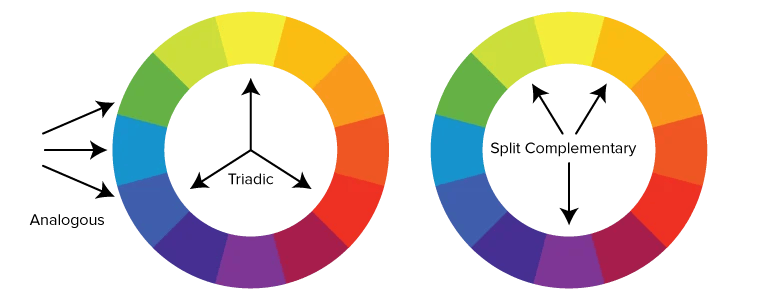
The combinations that get the most clicks include:
- Black + Yellow: the highest contrast you can get. A bright yellow subject on black is very hard to scroll past. Good for high-energy and dramatic videos.
- Red + White: urgent and clean. White text on red is easy to read and feels important. Good for news and bold claims.
- Blue + Orange: opposites on the color wheel. Blue signals trust while orange adds warmth and draws the eye. Good for tech and tutorials.
- Green + Gold: money and success in one image. A common choice for finance and results videos like “how I earned $10,000.”
- Purple + Yellow: a premium base with a bright accent. It stands out because few creators use it. Good for beauty and creative videos.
To build your own palette, pick two colors that contrast well. Use one as the background and the other as the accent. Add one neutral color (black or white). That’s it. Every extra color competes for attention and makes the thumbnail harder to read. The pair you pick should depend on your niche.
Best Color Psychology for YouTube Thumbnails by Niche
Viewers expect certain colors in each category. The best palettes match those expectations and add one contrasting color. Use this table as a starting point:
Use these suggestions as a starting point, not a rule. Search your topic, look at the top five thumbnails, and pick colors different from theirs. If every competitor uses red, a clean blue or bright teal can help yours stand out. But even a strong palette fails if the layout is cluttered.
What Is the Rule of 3 for YouTube Thumbnails?
The rule of 3 refers to two ideas, and both help you get clicks:
Rule of thirds: picture a grid of nine equal squares over your image. Place your subject where the lines cross, not in the center. This looks more dynamic and leaves space for text on the other side.
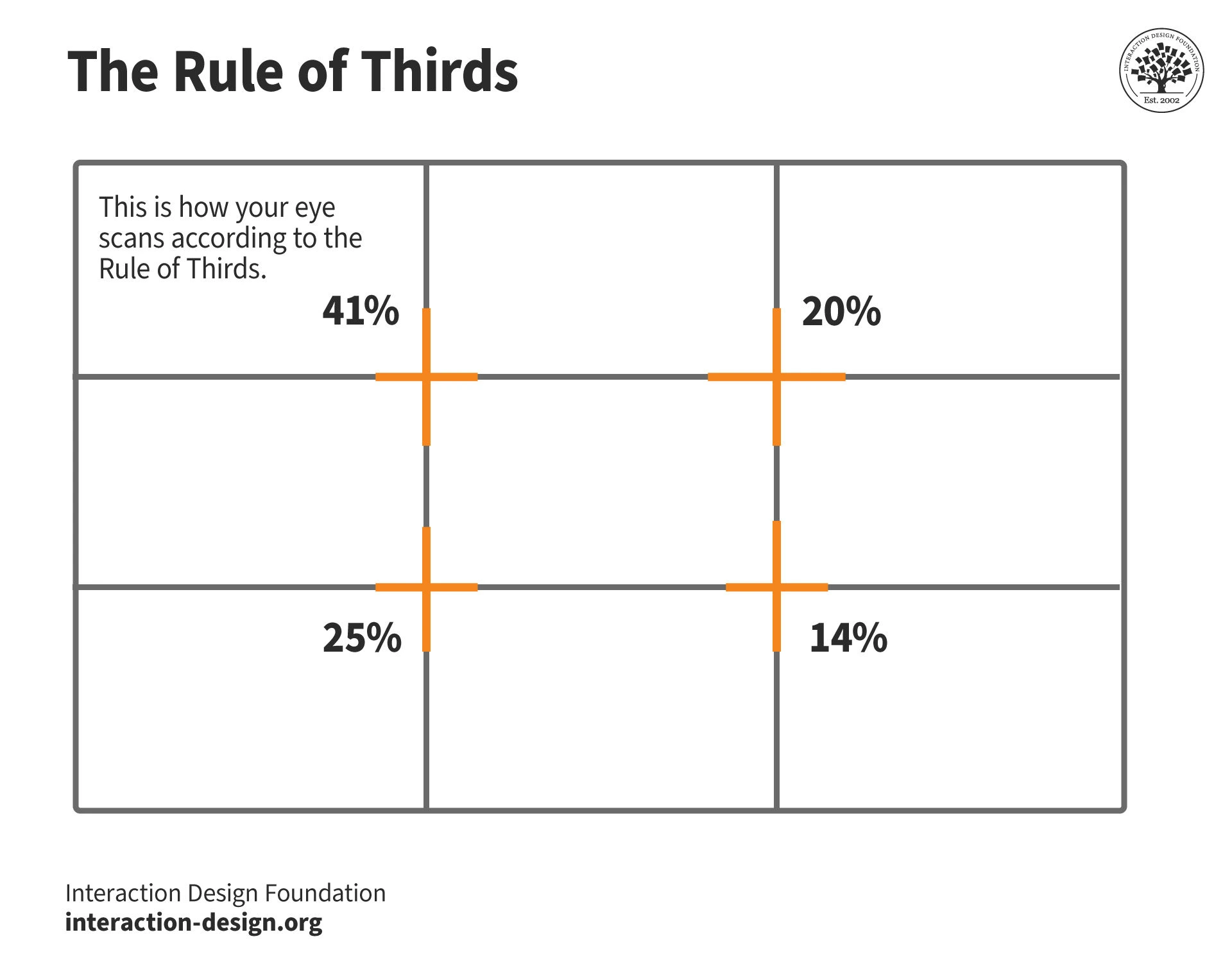
Maximum three elements: one main image, one short line of text (3 to 5 words), and one logo or accent. Anything more is harder to read at a glance.
Check this thumbnail design on Alex Hormozi’s channel:
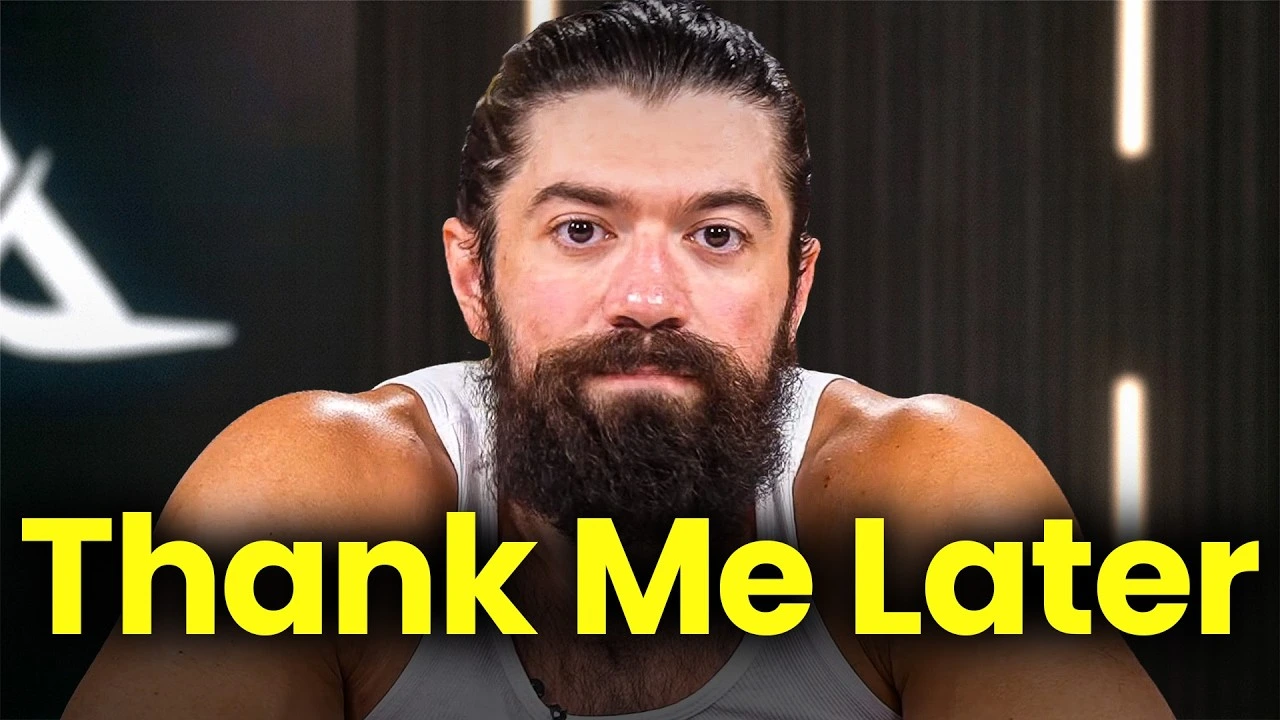
The same rule applies to color. Two or three colors keep the design readable and give your channel a consistent look. We recommend leaving 30 to 40% of the image as empty space so your subject has room around it. A cluttered thumbnail looks amateur, and viewers notice that before they click. But a clean design still has to work in the places people actually watch.
Don’t Forget Dark Mode, Mobile, and Color Blindness
Most designers build thumbnails on a large, bright screen, but that is rarely how viewers see them. Three real conditions can ruin a good design:
Mobile-first: Majority of content consumption on YouTube happens on mobile. So you have to design it at full size first, then shrink the preview to about 120 pixels wide and check if the subject and text are still readable.
Dark mode: Many viewers now use dark mode, where a pure-black background blends into the page and hides the edges of your thumbnail. Add a thin border or a slightly lighter dark tone so the edges stay visible.
Accessibility: About 8% of people have some color blindness, usually with red and green. If your thumbnail relies on telling red from green, some viewers will miss it. Pair color with contrast, position, and text so the message still works.
A quick check covers all three: shrink the thumbnail, squint, and look at it on your phone in dark mode. If the subject and text are still clear, the design works. But your best guess is still a guess until you test it with real viewers.
It's Time to Test The Color Combinations
Best practices give you a good starting point, but your audience decides the winner. In 2026, testing is easier than ever.
In December 2025, YouTube rolled out title and thumbnail A/B testing to all creators with advanced features. You can now test up to three thumbnails, titles, or combinations per video, and the test runs up to two weeks before picking a winner. In October 2025, YouTube also raised the thumbnail file size limit to 50MB, so high-resolution colors and gradients stay sharp.
One detail changes how you should read the results. YouTube picks the winner by watch time per impression, not by click-through rate. This matters because a shocking color combination can get clicks from viewers who leave right away, which now hurts you. The versions that win bring in viewers who stay.
Partner With Us for Thumbnails That Get Clicks
The click is the first step in every view, and it is the hardest one to earn. The good news is that it is not luck. Every click comes from a chain of choices: contrast that makes the thumbnail easy to see, a color that sets the right mood, a combination that fits your niche, a clean layout, and text that reads at any size.
The steps in this guide are not a one-time fix. They are an ongoing system. Colors that work today can fade as your niche shifts and other creators copy them. Test your thumbnails, find where your click-through rate drops, and fix that before you add more videos.
If you want expert help building and running this system for your channel, GrowthOS offers dedicated YouTube growth services covering channel audits, thumbnail design, color and A/B testing strategy, and SEO optimization. The team handles the framework so you can stay focused on creating.

Pritesh Jagtap
Founder
Pritesh Jagtap is the founder of GrowthOS, where he helps startups and creators scale through growth systems, content, and SEO/ GEO strategies. With a background spanning growth, marketing, and operations, he’s passionate about building frameworks that drive sustainable results. Beyond GrowthOS, he experiments with creative projects, explores moutains trails and be around offline communities.

More insights
Get Growth Insights Delivered to Your Inbox
Join B2B marketers getting weekly strategy breakdowns on SEO, AI search, PPC, and YouTube—straight talk, no generic advice.
Oops! Something went wrong while submitting the form.




.svg)